Monday, 5 July 2021

SQL to find the System Properties | Maximo

Some times we restore our production database to other development environment, but its a best practice to disable few things first before we run the application. one of the examples is to stop the email/communication templates. 

2 tables are handling System Properties in Maximo:


1. SELECT * FROM MAXPROP;

2. SELECT * FROM MAXPROPVALUE;


Below example to find the SMTP host which is used to send emails from Maximo. We can update this property to disable the emails. 


SELECT MAXPROP.PROPNAME, MAXPROP.DESCRIPTION, MAXPROPVALUE.PROPVALUE

FROM MAXPROP join MAXPROPVALUE ON MAXPROP.PROPNAME = MAXPROPVALUE.PROPNAME

WHERE MAXPROP.PROPNAME = 'mail.smtp.host'

Tuesday, 22 June 2021

Enable Maximo Activity Dashboard for Maximo 7.6 | Maximo

There is one system property as below, just set it to True

mxe.webclient.activitydashboard = true


And use this URL to access Activity Dashboard:

http://<hostname>:<port>/maximo/webclient/utility/profiler/PerfMon.jsp


 Enabling PerfMon will significantly degrade server performance and so it should not be left enabled any longer then necessary to troubleshoot performance problems, especially on a production server.

Reference: https://www.ibm.com/support/pages/node/1133601

Tuesday, 15 June 2021

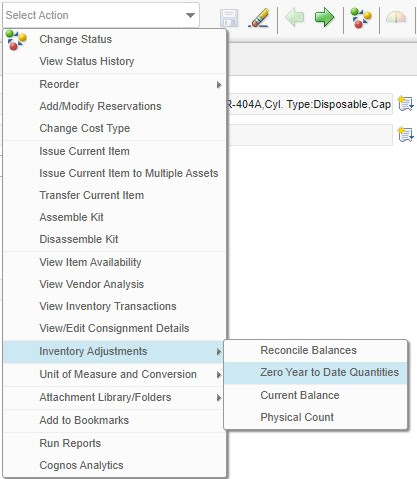
Inventory Issued Year to Date (YTD) and Reset Annually | Maximo


This Year to Date (YTD) attribute in Inventory application shows us the count of issuance of the item during the whole year. 

It's one of the task of Store Manager; to reset it and roll the counter one year down. 

Maximo gives us 3 counters, Last year , 2 Years ago and 3 years ago as depicts in the right image.


There is an option is the Select Action menu as below:


Thursday, 3 June 2021

Implicit Variable of Domain Synonym List in Relationship Where Clause - SQL | Maximo

Another way in the SQL condition while creating Relationships in Maximo:


get all synonym values of CLOSE,CAN from work order status


 :&synonymlist&_wostatus[CLOSE,CAN]

is equivalent to

SELECT VALUE FROM SYNONYMDOMAIN WHERE DOMAINID = 'WOSTATUS' AND MAXVALUE IN ( 'APPR')


Usage:

Let's make a relationship and enter this condition within a where clause;


Other useful bind variables are here:

&USERNAME&, &APPNAME& and other special bind variables you can use (ibm.com)

Tuesday, 25 May 2021

Add a Hyperlink in Help Menu | Maximo

To add an external Hyperlink to the Help Menu in Maximo.


1. Export MENUS.xml from Application Designer application. 

2.Open it in any text editor and search for <menu id="HELP">

3. Now add this line at your choice as below: 

    <menu id="HELP">
        <menuitem event="maximohelp" id="tophelp" image="menu_icon_apphelp.gif" label="IBM Knowledge Center" licensekey="EAMTOPHELPMENU" value="mxe.help.maximohelplink"/>
        <menuitem event="apphelp" id="help1" image="menu_icon_apphelp.gif" label="Help"/>
        <menuitem id="IBMesupport" label="IBM Electronic Support">
            <menu id="IBMesupportsub">
                <menuitem event="loadlink" id="esupportmam" label="Asset Management Online Support" link="http://www.ibm.com/support/docview.wss?uid=swg21418666&amp;ibmprd=tivmx7"/>
                <menuitem event="loadlink" id="esupport3" label="IBM Support Assistant" link="http://www.ibm.com/software/support/isa?ibmprd=tivmx7"/>
                <menuitem event="loadlink" id="esupport4" label="Support Portal" link="http://www.ibm.com/support/entry/portal?tivmx7"/>
                <menuitem event="loadlink" id="esupport5" label="My Notifications" link="http://www.ibm.com/support/mynotifications?ibmprd=tivmx7"/>
                <menuitem event="loadlink" id="esupport6" label="Cloud and Smarter Infrastructure Software Training and Certification" link="http://www.ibm.com/software/tivoli/education/index.html?ibmprd=tivmx7"/>
                <menuitem event="loadlink" id="IBMcorp" label="IBM Corporation" link="http://www.ibm.com"/>
                <menuitem event="loadlink" id="Google" label="Google Search" link="http://www.google.com"/>
            </menu>
4. Import again into Application designer, and you are done. 


Reference: https://www.ibm.com/support/pages/how-hyperlink-new-browser-window-maximo-title-bar

Monday, 24 May 2021

Call Maximo Script from Rest API (http call) (Create SR Example) | Maximo

 Create a simple script in Maximo and Call the Maximo Rest API request to post/get the data.

Let's create a simple automation script, it will create an SR with minimal information. 

1. create a script in automation script application with below code:

from psdi.server import MXServer;
srSet = MXServer.getMXServer().getMboSet("SR", MXServer.getMXServer().getSystemUserInfo());
newSR = srSet.add();
newSR.setValue("TICKETID", request.getQueryParam("ticketid"));
newSR.setValue("DESCRIPTION", request.getQueryParam("description"));
srSet.save();


2. Now send below  request from Postman or any other tool:

http://localhost/maximo/oslc/script/createjsonsr?_lid=maxadmin&_lpwd=maxadmin&ticketid=123&description=test ticket


or We also can send the data in payload

POST http://localhost/maximo/oslc/script/createjsonsr

MAXAUTH <encoded 64bit>

{
    "ticketid" : "123456",
    "siteid" : "BEDFORD",
    "description" : "test SR from http call"
}


parameter appended in query string after (?)

request.getQueryParam("variable")

To get the user info from the request

request.getUserInfo()

read and parse the request to get the payload. 

res = JSONObject.parse(output)
vId = res.get("id")
mbo.setValue("description",vId)


Sunday, 23 May 2021

SurveyMonkey Integration – Call External API from Automation Script | Maximo

In the continuation of my last post "integration with Survey Monkey through Zapier". 

I had another requirement to implement a customization to directly call the external API of Survey Monkey from Maximo.

Below are the 2 steps procedure, first is the list of APIs we are going to call in a sequence from Maximo Automation Script, and then the detail code I used.

Prerequisites: 

  • Survey Moneky Account, Token
  • Design Survey and enable "Embed First Question" in the Email
  • Create an Email collector 
  • Get the id of the newly created Email Collector


A. Three APIs we are going to call for this project from Automation Script: 

  1. https://api.surveymonkey.net/v3/collectors/{{COLLECTOR_ID}}/messages
    1. {
        "type""invite",
        "subject""Survey for the Ticket {{myextrafield}} {{CustomData1}}",
        "is_branding_enabled"true,
        "embed_first_question"true
      }
  2. https://api.surveymonkey.net/v3/collectors/{{COLLECTOR_ID}}/messages/{{MESSAGE_ID}}/recipients
    1. {     "email""abdulqadeer.el@gmail.com",     "custom_fields": {    "1""c1"},     "extra_fields": {     "myextrafield""1234"   }    }
  3. https://api.surveymonkey.net/v3/collectors/{{COLLECTOR_ID}}/messages/{{MESSAGE_ID}}/send
    1. { }

B. Jython code can be implemented on any object, for testing I am using SR object before-save trigger. 

Monday, 17 May 2021

Invoke End Point from Automation Script | Maximo

 To read from any webservice/rest as a client, just use below code to call any existing endpoint with http handler. 


from java.util import HashMap,Calendar

from com.ibm.json.java import JSONObject

response=service.invokeEndpoint("SURVEY-endpoint name",map,body1)

body = JSONObject.parse(response)

mbo.setValue("description",response[:200])

#mbo.setValue("description",body.get("data")[1].get("email"))

Tuesday, 11 May 2021

Send SurveyMonkey from Maximo using Zapier (Call a query string from Automation Script)

Calling an external URL from Maximo Automation scirpt to achieve this requirement. 

Requirement was; To send SurveyMonkey's survey to the EndUser/Customer when the  status of Service Request is Resolved.

3 things we needs for this excerise:

  1. Maximo Automation 
  2. Zapier Webhook
  3. Survey Email in Survey Monkey

1. Design a survey in Survey Monkey, Create Collector as Email. 

2. In Zapier make a Catch Hook, get the API  and append any parameter as query string (&ownerid) etc.

3. In Zapier make an Action to connect with Survey Monkey and trigger Contact Send.

Thursday, 11 February 2021

Overdue Duration Calculation Between Two Dates (Excluding Weekends) using Automation Scripts | Maximo

We have two dates, the status date: rcareviewdate and Etc date:rcainprgdate. The script below calculates the duration in Hours excluding weekends between these two dates based on attribute status date change. 

When we change the status it will calculate overdue for previous status ETC date and current status change date.

Launch Point Type:     Attribute Launch Point

Attribute:                     CHANGEDATE

  #Imports


from java.util import Date 

from java.text import SimpleDateFormat

from psdi.mbo import MboConstants 

from psdi.server import MXServer

from java.util import Calendar

from psdi.app.common import DateUtility


#Milliseconds Constants

MILLISECONDS_DAY= 86400000 

MILLISECONDS_HOUR = 3600000

MILLISECONDS_MINUTE = 60000 


#Default hours and minutes values

days = 0

hours = 0

minutes = 0 

Tuesday, 2 February 2021

Rest / OSLC API Authentications Native or LDAP (Basic/Form) | Maximo

The most common forms of authentication to use with REST API are:

  • Native - (MaxUser Tables)
  • LDAP - (Directory service authentication)

Update: In Mas Manage, The former methods of utilizing maxauth (native authentication) or basic auth (LDAP) are no longer supported because MAS provides its own OIDC identity provider OOB. So we need to utilize API key and utilize the /maximo/api route. 

Native Authentication
   is configured to manage users' credentials within Maximo MaxUsers tables. Maximo is responsible for authenticating all the incoming REST calls. 

The Below System property tells us the application security is off. Also, the HTTP request header and return are shown below:

System Property


mxe.useAppSecurity

0

URL call


http://localhost/maximo/oslc/login

Request Headers


MAXAUTH

<BASE64encoded user:password>

Response in Return


JSESSIONID

As cookie to maintain the same session


NOTE: Postman automatically save these cookies and utilize them for subsequent calls, but it can be handled programmatically. 

LDAP
The Below System property tells us the application security is ON.

System Property


mxe.useAppSecurity

1

in LDAP Maximo uses directory authentication and validates users' credentials from the directory configured in WebSphere.

In this case, security settings are defined in WEB.XML file in below mentioned 4 files

  • maximo/application/maximoweb.xml
  • maximo/application/maxrestweb.xml
  • maximo/application/mboweb.xml
  • maximo/application/meaweb.xml
  •     in these files <login-config> section needs to be uncommented to use either FORM or BASIC authentication. 


    Monday, 1 February 2021

    Display Attribute Value in Message Tracking as External Message Id | Maximo

    To track or find the messages in the message tracking application is sometimes very difficult. But we can tweak this by extracting and displaying some of the message information in the External Message column in the list view. This way it will be helpful to find the relevant message. 


    For instance: Let's say that we have an inbound message utilized by continues cron on the WORK ORDER object. 

    Message tracking is also enabled, we can see the work order number in the list view by putting this string in the External Message ID configuration as below:


     In the services > Select Action > Message Tracking > enable message tracking and 

    enter below into External Message-Id: 

    operation/integration-object-set/main-MBO/attribute with namespace as in the below example

    Example:

    {http://www.ibm.com/maximo}SyncWORKORDEROS/{http://www.ibm.com/maximo}WORKORDEROSSet/{http://www.ibm.com/maximo}WORKORDER/{http://www.ibm.com/maximo}WONUM


    Tuesday, 26 January 2021

    SQL to find the Next Working Day and skip the Weekend. | SQL DB2

    An example of Db2-SQL to find the next working day and skip the weekend. In this example Friday and Saturday both are weekends.

    SELECT
         sysdate AS current_date
        ,DAYNAME (sysdate) current_day
        ,sysdate + 3    AS come_after_3_days
        ,DAYNAME (sysdate+3) oh_after_3_is_friday
        ,decode(DAYNAME (sysdate + 3)
                ,'Friday',(sysdate + 3) + 2
                ,'Saturday',(sysdate + 3) + 1
                ,(sysdate + 3)
               ) so_the_nextworkday_is
        ,dayname(decode(DAYNAME (sysdate + 3)
                        ,'Friday',(sysdate + 3) + 2
                        ,'Saturday',(sysdate + 3) + 1
                        ,(sysdate + 3)
                        ) 
                ) AS so_the_nextworkday_is_sunday
      FROM
        sysibm.sysdummy1

    Monday, 25 January 2021

    Import SSL from the External Secured URL into Websphere Trust Store | WebSphere

    To use the External Services in Maximo, or to integrate with an external system like MS Outlook 365, BIM by Autodesk Revit, or GIS, or any web/rest service. 

    All famous browser generally trusts almost all known Certificate Authorities (Digicert, Google Trust Services and so on.) 

    But when it comes to Websphere, it doesn't work. Only the Administrator specifically instructs WebSphere to trust by importing the certificate into the Trust Store either at the Cell level or Node level.


    Let's instruct Websphere to import a Gmail certificate

    1. Webspher > Security > SSL Certificates and Key management > Key stores and certificates> select  CellDefaultTrustStore(if cluster) / NodeDefaultTrustStore
    2. Then Click Signer certificates > Click on Retrieve from port
      • Host: hosturl i.e google.com
      • port :  443
      • Alias: any name, i.e gmail
    3. press Retrieve signer information (retrieved signer information is displayed)
    4. hit Apply and OK. 
    5. restart cell manger service, nodeservice to take effect. 
    6. done. 

    ----------------
    errors we commonly see if a trust store is missing:

    • PKIX path building failed: java.security.certi.CertPathBuilderException:
    • PKIXCertPathBuilderImpl could not build a valid CertPath.
    • Certificate issued is not trusted
    • BMXAA1477E - the connection failed to the HTTP handler for the endpoint. 
    • etc


    Elapsed Time in View Status Dialog - Jython | Maximo

    Add an additional column in View History Dialog to see the time elapsed for each status. 

    This is a modified version of the solution written by Bruno for the same topic. 

    We will accomplish this task with an attribute in the status table and an object-level launch point script written in Jython. 


    1. Add a column in PRSTATUS table,  Name: ELAPSEDTIME, Type: Duration.

    2. Display this column into View History Dialog using the application designer of the PR application.

    2. Write an Object Launch Point Script: Object: PRSTATUS , Save, Add, AfterSave. Copy below the body and paste it. 

    Tuesday, 19 January 2021

    Python Function - Find the Next Business Days After n Days | Maximo

    You have 15 business days (exclude weekends) to complete the task, what will be the 15thday?


    from java.util import Calendar

    #Function definition
    def getNextBusinessDday(dn ):
        cal = Calendar.getInstance();
        cal.setTime(d)
        loop=1
        while(loop<=n) :
            cal.add(cal.DATE, +1)
            if (cal.get(cal.DAY_OF_WEEK)) not in [cal.FRIDAY,cal.SATURDAY] : 
                loop=loop+1
            vserial = loop
        calculatedetc = cal.getTime()
        return calculatedetc

    #variables for input
    d = mbo.getDate("changedate")
    n = 15

    #function call whereever you want in the same script
    getNextBusinessDday(d,n)

    Reuseable Scripts - Invoke a Script from a Script - Jython | Maximo

     Question:

    1. Can we invoke a script from another script?
    2. Is it possible to reuse the existing Script?
    3. Can we make the Global function and call it in the script when required?

    Solution:

    My answer is yes to all the above questions, let's start with this example. 

    --- " Do this job within 5 business days (excluding weekends (Friday, Saturday))! "

    Okay. Today is 19-Jan, what is my, etc after 5 days.


    we will handle this with 2 scripts: 

    1. a library script to take the parameter of date + days and gives an output. 
    2. our script from where we will call the library script. 
    1. Create a Library Script and name it any like "LS-GETNEXTBUSINESSDAY"
    copy the paste the code below into the body of it. 

    from java.util import Calendar
    cal = Calendar.getInstance();
    cal.setTime(d)
    loop=1
    while(loop<=n) :
        cal.add(cal.DATE, +1)
        if (cal.get(cal.DAY_OF_WEEK)) not in [cal.FRIDAY,cal.SATURDAY] : 
            loop=loop+1
    vNextBDay = cal.getTime()

    2.  Call this function from another script with 2 parameters d, n ( date, days)

    Monday, 4 January 2021

    Create Purchase Requisition from Inventory Usage using Action Script (Customized Option) | IBM Maximo

    Recently we had the requirement to disable the direct MR to PR automation. so instead of

    creating direct PR from MR, the users will select a store on material requisition to reserve material

    from store. When the MR is approved, the inventory usage is created from MR.

    If the material is available in-store, storeroom will issue the material otherwise he clicks the option

    to create Purchase Requisition (PR) from inventory usage.

    So we developed this new functionality.

    Note: This script contains a few custom attributes. I have commented those line, In your case please remove them.

    Step 1:

    First Add new Status for Inventory Usage Application: PR_CREATED

    Step 2: Create Automation Script

    Launch Point:        ACTION

    Object:                  INVUSE

    Variable:                v_mr

    Binding Value:      INVUSELINE[MRNUM is null].MRNUM*

    Relations:              INVUSE --> INVUSELINE -->MRNUM (child object:MR, mrnum=:mrnum)

    Sunday, 27 December 2020

    IBM Support Terminology

     APRR (defect)

    a request / defect reported to IBM (authorized program analysis report)


    TPAE (application architecture)

    Tivoli's Process Automation Engine / Base Services

    Core Java Classes that can be used to build Java applications. 

    Benefit: The benefit of using TPAE architecture is that the core functionality of many Java applications DOES NOT need to be coded by the application. Each application relies on base classes for core functionality rather than to code in each.

    base system core functionally, security tools for user, role, group management


    Interim Fix (patch):

    a patch to fix a confirmed product defect reported by clients from IBM technical developers reported. 

    It contains 1 or more product defects/APARs. the most common patch that IBM delivers.


    Fix Pack (Cumulative patches):

    A cumulative collection of all patches/fixes since that last released FP. (usually every after 4 months)


    Service Pack: (like windows sp1,2,3,4 and then new windows like from 98 to xp, 7, 8,10)

    A new feature release


    Delete a Person from a list of Person Groups (Dialog, Automation Script) | Maximo

    A revised version of the existing post Delete a Person from Person Groups (LIST VIEW QUERY) using Automation Script | Maximo.

    We are going to add a dialog box on the list view of Person Group Application to choose the Person to be deleted


    1. New Non-Persistent Object with one attribute Personid

    • Object Name: NP_DELETE_PERSONID
    • Attribute:        NP_personid

    Thursday, 24 December 2020

    Reassign Workflow Assignments in Bulk using Escalation | IBM Maximo

    Sometimes you have the requirement of reassignment of 200-300 workflow assignments for users.

    You can reassign the workflow assignments using an Escalation based on the WFAssignment object. In this example, we will reassign all of Umar's (personid=116524) WF Assignments for application to Qadeer. To do all of Umar's assignments, not just the specific application assignments, leave off the "app =" parameter used below. 

    Condition:

    WFID != 0 and assignstatus = 'ACTIVE' and assigncode = '116524' and app = 'SR'

    Create escalation point bute Leave all the escalation point fields empty. Repeat is off

    Create and Attach Action:

    Create an action on the same object with set Value of replacement user's assigncode.

    Wednesday, 23 December 2020

    Invoke/Call any dialog from Automation Script | Maximo

    Question:
    Can we invoke/call my custom dialog or any dialog from the automation script, like we usually can trigger it from the Push button or from Select Action of the application 

    Answer:

    Yes, you can in the latest version 7.6.1. 

    1. Get the dialog name from the application designer 
    2. using below mentioned automation script to call it. 

    In my example, I created one object launch point automation on the work order application to trigger automation. 
    Below is the body of the automation in which I called one of the standard change status dialogs. 


    from psdi.server import MXServer
    from psdi.mbo import MboConstants
    from psdi.common.context import UIContext
    from psdi.webclient.system.controller import SessionContext, Utility, WebClientEvent
    mxServer = MXServer.getMXServer()
    userInfo = mxServer.getUserInfo("maxadmin")
    vmbo = mbo.getString("wonum")
    if vmbo == '30352551':
        context = UIContext.getCurrentContext()
        if context:
            wcs = context.getWebClientSession()
            Utility().sendEvent(WebClientEvent("status", wcs.getCurrentPageId(), None, SessionContext(wcs)))
            #service.error("",str(abc))


    To Close a dialog, either use "okdialog" or in the newer version in can be done with 1 line of code:

    service.closeDialog() 

    Tuesday, 22 December 2020

    Make Memo field mandatory on specific inputs in workflow | Maximo

     It's very simple by using just once Global data restriction based on conditions.


    1. create an expression using Conditional expression Manager (copy this)

    (
        :ACTIONID in (
            select
                distinct ACTIONID
              from
                WFACTION
             where
                1 = 1
                and PROCESSNAME = 'SR'
                and PROCESSREV='1'
        )
    )

    2. Create Global Data Restriction -> Attribute Restriction -> New Row

    Object : INPUTWF
    Attribute : MEMO
    Application : SR
    Type : QUALIFIED
    Reevaluate ? y
    Condition : myCondition (the one we created in step 1)

    Sunday, 20 December 2020

    Workflow Handling from Automation Script | IBM Maximo

    Initiate a workflow from an Automation Script. 

    from psdi.server import MXServer

    mxs = MXServer.getMXServer()

    wfstart = mxs.lookup('WORKFLOW')

    wfstart.initiateWorkflow('CSPREIMB',mbo)


    -------------------------

    Or define a function in your script and call it whenever needed as below:

    Function Defination:

    def startwf(a):
       actionSet = MXServer.getMXServer().getMboSet("action", a.getUserInfo());
       sqf = SqlFormat("action = :1")
       sqf.setObject(1, "action", "action", "STWFEUNRI")
       actionSet.setWhere(sqf.format())
       actionSet.reset()
       actionSet.getMbo(0).executeAction(a)


    Function Call:

    startwf(MboVariable)

     2. Stop an active workflow from the Automation Script. 

    from psdi.server import MXServer

    mxs = MXServer.getMXServer().lookup('WORKFLOW') 

    wfstop = mxs.getActiveInstances(mbo)

             wfstart.getMbo(0).stopWorkflow('Stopped')

     or 

        wfInstanceSet=mbo.getMboSet("$wfInstanceSet","WFINSTANCE","processname='IBMMAINWF' and ownertable='WORKORDER' and ownerid=:workorderid and active=1")

    wfInstanceMbo=wfInstanceSet.moveFirst()

    if wfInstanceMbo:

            wfInstanceMbo.stopWorkflow("Stopped because Type becomes DLP")


    Invoke Action from Automation Script | IBM Maximo

    from psdi.common.action import Action, ActionRemote

    from psdi.security import UserInfo

    from psdi.server import MXServer


    mxServer = MXServer.getMXServer()

    userInfo = mbo.getUserInfo()


    actionSet = mxServer.getMboSet("ACTION", userInfo)

    actionSet.reset()

    actionSet.setWhere("action = 'INV_RUN_REP'")


    if(not actionSet.isEmpty()):

    action = actionSet.getMbo(0)

    action.executeAction(mbo)

    actionSet.close()