Showing posts with label domains. Show all posts

Saturday, 22 December 2018

Conditionally Attaching and Limiting any Domain through Automation Script | IBM Maximo

sometimes requirements are like we need to redefine a domain; lets say a table domain to any attribute, or we may want to change domain as the condition changes.

 suppose End user is only able to see item as per the storeroom dynamically and only the items with reorder is enabled while planning material in workorder application.


1. create a new Table domain
domain: WPITEM
validation: itemnum = :itemnum
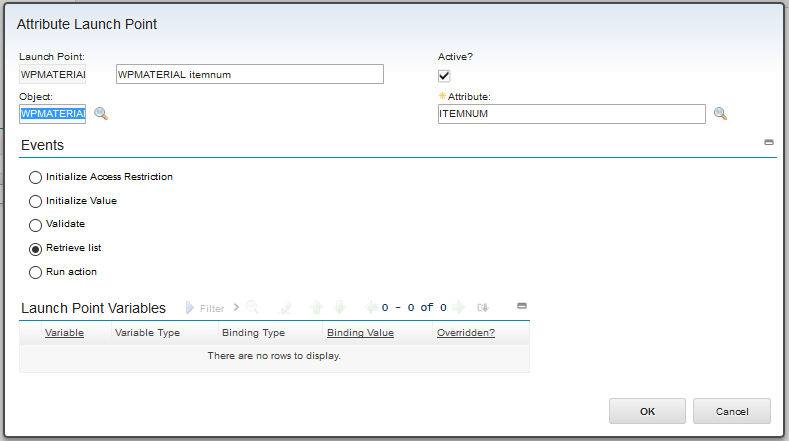
2. Write an Attribute Launch Point
Object: WPMATERIAL
Attribute: ITEMNUM
Events: Retrieve List

we will write the WHERECLAUSE in our script as per the conditions.


Wednesday, 31 August 2016

How to Add lookup to a custom field? | IBM Maximo

In this example we are going to create a new custom field in work order tracking application. And then we are going to attach a lookup to select existing people records.

  1. Create a new Table domain in Domain Application
    • Domain:    myPersonDomain
    • Object:        PERSON
    • Validation where clause:    personid = :myCustomField (same name as field in application) 

Saturday, 26 December 2015

Limit out of the box lookups using WHERELCLAUSE by using LOOKUP.XML - IBM Maximo


Let’s start with an example, suppose our requirement is to limit Work types in Work Order Tracking application to just show CM and PM.
Therefore, we achieve this by using below mentioned solution:

Go to > System Configuration > Platform Configuration > Application Designer
click on Export System XML from Select Action
Click on blue blued juxtaposed to LOOKUP and then Save into your computer.


Note: make a copy to backup LOOKUPS.XML first.


1. Open LOOKUP.XML in your favorite editor, mine is Notepad++ and find html tag looks like this:
<table id="worktype" inputmode="readonly" selectmode="single"