Showing posts with label Escalation. Show all posts

Thursday, 13 January 2022

Delete Outbound Error Messages from Message Reprocessing Application | IBM Maximo


Deleting error messages requires two actions. 

First the DELETEFLAG must be set to 1, then the status changed to RETRY. 

Both of these are done transparently when deleting a message in the Message Reprocessing application. In an escalation they must be done in the correct order.

Warning: Be very careful when using this escalation to delete held messages. If valid transactions are sent in while this escalation is active, and they fail due to a correctable error, they can be deleted.

In the Escalations application, create a new escalation.

Applies To: MAXINTERROR

Condition: status=status='HOLD' and queuename = 'jms/maximo/int/queues/sqout'

Add an escalation point and check the Repeat box.

Add an action. Use the lookup arrow to Go To the Actions app to create the Action.

Create a new Action with the following values:

Object: MAXINTERROR

Type: Set Value

Value: 1

Parameter/Attribute: DELETEFLAG

Save and Return with Value to the Escalations application.

Tuesday, 15 June 2021

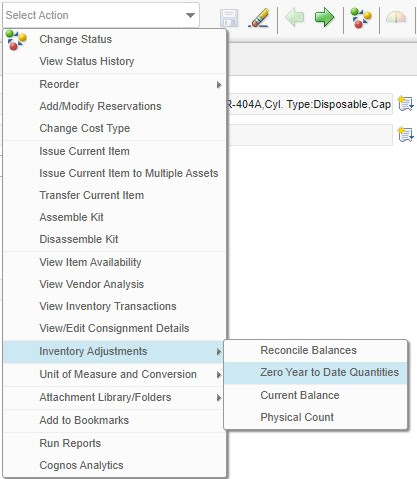
Inventory Issued Year to Date (YTD) and Reset Annually | Maximo


This Year to Date (YTD) attribute in Inventory application shows us the count of issuance of the item during the whole year. 

It's one of the task of Store Manager; to reset it and roll the counter one year down. 

Maximo gives us 3 counters, Last year , 2 Years ago and 3 years ago as depicts in the right image.


There is an option is the Select Action menu as below:


Thursday, 24 December 2020

Reassign Workflow Assignments in Bulk using Escalation | IBM Maximo

Sometimes you have the requirement of reassignment of 200-300 workflow assignments for users.

You can reassign the workflow assignments using an Escalation based on the WFAssignment object. In this example, we will reassign all of Umar's (personid=116524) WF Assignments for application to Qadeer. To do all of Umar's assignments, not just the specific application assignments, leave off the "app =" parameter used below. 

Condition:

WFID != 0 and assignstatus = 'ACTIVE' and assigncode = '116524' and app = 'SR'

Create escalation point bute Leave all the escalation point fields empty. Repeat is off

Create and Attach Action:

Create an action on the same object with set Value of replacement user's assigncode.

Tuesday, 13 February 2018

Stop Workflow in BULK by Escallation | IBM Maximo

Lets say we want to stop the workflow for multiple PRs at once. We can achieve this creating a new escalation and schedule it perform this action automatically.

for instance, we want to stop PR-123 from backend, for that we are going to create a escalation and once action which will be attached with this escalation.


STOPWF_PR    Stop PR Workflow
Applies to: WFINSTANCE
Condition:
active = 1 and ownertable = 'PR' and exists (select 1 from PR where PR.PRID = wfinstance.ownerid and prnum in ('PR-123')
)
Schedule: Your desired time and date. suppose every 1 minute

Escalation point: Add a row only, no need to enter anything
 
Action : STOPWF
Create a new action and attached to this escalation
 
Action: STOPWF Stopwork
Type: Custom Class
Custom Class: psdi.workflow.StopWorkflowAction (auto populated)
Accessible from:
ESCALATION

Wednesday, 29 November 2017

Generate Alert Notification on Condition Monitoring Warning Limits Using Escalations | IBM Maximo

We can generate alert notification email in IBM Maximo condition monitoring application when the measurement value of gauge meter crosses the upper or lower warning limit. The following escalation will generate the email when the measurement value for the asset meter is between upper and lower warning and action limits.


  1. OBJECT:          MEASUREMENT