Showing posts with label inventory. Show all posts

Tuesday, 15 June 2021

Inventory Issued Year to Date (YTD) and Reset Annually | Maximo


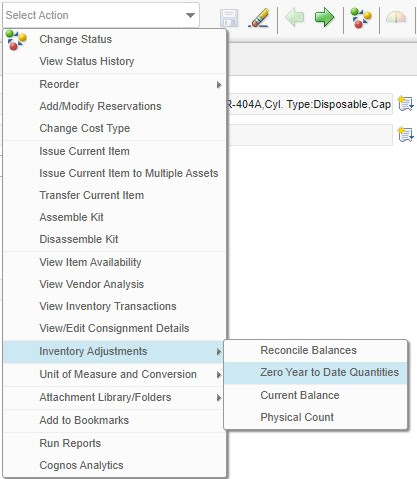
This Year to Date (YTD) attribute in Inventory application shows us the count of issuance of the item during the whole year. 

It's one of the task of Store Manager; to reset it and roll the counter one year down. 

Maximo gives us 3 counters, Last year , 2 Years ago and 3 years ago as depicts in the right image.


There is an option is the Select Action menu as below:

Friday, 13 November 2015

Inventory Issue and Return Transactions deep inside – IBM Maximo


With Inventory Usage application, we can Issue and Return items between sites within the same organization.      
Maximo uses the date and time to Actual Date field to determine the Financial Period for transaction. And the Actual Date field defaults to the system date and time (sysdate).

1.            Issue Items: -     When we hit Save button, Maximo writes a record MATUSETRANS table in database with ISSUETYPE=ISSUE, negative QUANTITY, and LINECOST in positive. 
Example:
                Suppose we issue 20 items at the cost of 0.5$ each from storeroom.

Wednesday, 11 November 2015

Inventory Item, Current Count vs Physical Count. – IBM Maximo


Physical Count:
Physical count is what we actually have in our Storeroom/Inventory physically with specified date when we counted.
Current Balance/Count:
Current balance is what our inventory system is shown. 

If both are not same, then reconciliation should need to be done, so that they both counts will sync with each other.
For that, a two steps are needed in Maximo Inventory,
  1. Open required inventory item, Action  > Inventory Adjustment > Physical Count and enter New Count