Monday, 2 March 2020

how to use wildcard characters and Operators in Maximo

Maximo Wildcard Usage Examples.


* or %  
Substitutes for a string of characters
123* or 123% find records that start with 123, such as 123, 12345, and 123ABC.


? or _
Substitutes for a single character
123? or 123_ find any four-character records that start with 123, such as 1234, 1230, 123g.

When searching in a date field you can precede the date with a > (greater than), < (less than), or =

This only works when there is one window to search for a date (not two)  

~null~   searches for records that do not have an entry for the particular field.

!=~null~   searches for records that have an entry for the particular field.


Operator action Use

ampersand (&)  And

Find records that contain at least one occurrence of all of your query terms. The operator must be placed between two query terms.

hyphen (-)

Minus

Find records that contain one query term, but you want the presence of your second query term to cause the document to be ranked lower in the result set. The operator must be placed between two query terms.

pipe (|)

Or

Find records that contain at least one occurrence of any of your query terms. The operator must be placed between two query terms.

semicolon (;)

End of SQL command line

Indicate the end of a SQL command line.

tilde (~)

Not

Find records that contain one query term and not another. The operator must be placed between two query terms.


equals (=)

Exact match

Find records that are an exact match to your query. For example, filtering records with a status of "APPR" also returns records that have a status of "WAPPR" unless you type "=APPR" in the status field.

Not equals (!=)

Not match

Find records that are not a match to your query. For example, filtering records with a status of "!=WAPPR" finds records that do not have a status of “WAPPR”.

Friday, 28 February 2020

Find Records Between Specific DateTime Range | SQL

This Query is written in DB2 with Maximo on Workorder table, but I believe its the same for almost all.


SELECT w.reportdate
,to_date(to_char(CURRENT timestamp-1,'YYYY-MM-DD')||' 05:00:00','YYYY-MM-DD HH24:MI:SS' ) yesterday
,to_date(to_char(CURRENT timestamp,'YYYY-MM-DD')||' 05:00:00','YYYY-MM-DD HH24:MI:SS' ) today
FROM WORKORDER W
WHERE 1=1
--FETCH FIRST 10 ROWS ONLY
AND W.reportdate BETWEEN to_date(to_char(CURRENT timestamp-1,'YYYY-MM-DD')||' 05:00:00','YYYY-MM-DD HH24:MI:SS' ) AND to_date(to_char(CURRENT timestamp,'YYYY-MM-DD')||' 05:00:00','YYYY-MM-DD HH24:MI:SS' )

for Oracle: Use Sysdate instead of Current Timestamp

Tuesday, 25 February 2020

Utilization of Logging in Maximo

FATAL - A message logged at FATAL level indicates that the error is very severe and will cause the application not to function at all. This level is used only by the Maximo application framework code to indicate that the Maximo application failed.

ERROR - A message logged at ERROR level indicates that the application would continue to run, but a specific functionality that's processed by the current thread failed and would continue to fail until the processing information is altered.

WARN - A message logged at WARN level indicates that the application would continue to run, but a specific functionality that's processed by the current thread may be operating on some data that might not be appropriate.

INFO - A message logged at INFO level indicates a general message that highlights the progress of the specific functionality that's processed by the current thread.

DEBUG - A message logged at DEBUG level indicates a general message that provides fine-grained information about the progress of the specific functionality that is being processed by the current thread.

NOTE: The DEBUG level is used to log messages that are useful for customers, support and development to diagnose problems in detail, but it is extremely verbose and should be used sparingly.


FATAL > ERROR > WARN > INFO > DEBUG

This means that if a logger is enabled for INFO level, it would accept FATAL, ERROR, WARN level messages and discards DEBUG level messages.


For more info please check this IBM Tech note Logging in Maximo

Tuesday, 18 February 2020

Check Budget with Oracle ERP Through Publish channel and set flag 1 or 0 on PR and PO.

Check Budget with Oracle ERP Through Publish channel and set flag 1 or 0 on PR and PO.

Create End point for publish channel that needs to be used for Publish channel with ERP.

Publish Channel Endpoinnt = MEP

Define external system and publish channel for outbound transactions and Enterprise Service for inboaund transactions

Publish channel  = BDGT_CHECKINTERFACE
Enterprise Service = BDGTCHK_POINTERFACE

once everything is done for integeration side
Send request to ERP through automataion below.


create script with action launch point.
object = 'PO' , object = 'PR' in launch points.


import sys
from psdi.util.logging import MXLoggerFactory
from psdi.mbo import MboConstants
from psdi.util.logging import MXLogger
from psdi.iface.mic import MicService
from psdi.server import MXServer
from psdi.mbo import *
from psdi.webclient.system.session import WebClientSession
from time import sleep
from psdi.security import UserInfo
from psdi.server import MXServer

Uses of UIContext (bean) via automation Scrip to Access List View Filterst | IBM Maximo

There are scenarios where you need to access the current List View filter (including QBE and user-applied conditions) directly from an Automation Script.

Maximo provides access to this information through the UIContext and the active Web Client session.

Therefore, The following snippet demonstrates how to retrieve the effective WHERE clause applied in the current application’s list view (including both user filters and QBE criteria).


Traditional Approach

from psdi.common.context import UIContext

wclause = UIContext.getCurrentContext().getWebClientSession().getCurrentApp().getResultsBean().getMboSet().getUserAndQbeWhere()

service.error("", wclause);

-----------
and now More Concise and Readable Approach:

from psdi.common.context import UIContext
wclause = service.webclientsession().getCurrentApp().getResultsBean().getMboSet().getUserAndQbeWhere()

------------


Monday, 10 February 2020

Reconfigure DB2 after a Windows Hostname Change | DB2

1. replace the hostname in db2nods.cfg file at (c:\programdata\ibm\db2\db2copy\db2inst\)

2. open command prompt with admin rights and run these 2 commands to enable editing in registry

db2extsec –r

db2extsec /a DB2ADMNS /u DB2USERS

3. open registry editor (regedit), find and replace host name in all values

HKEY_LOCAL_MACHINE\Software\IBM\DB2


Monday, 27 January 2020

A Custom Solution to Get Survey from User when SR is Resolved | IBM Maximo

This summary is not available. Please click here to view the post.

PMSTATUS table to make history of PM records | Maximo

Maximo doesn't support us to have a history of status changes for Preventive Maintenance applications like XXSTATUS table is available for almost all applications.

We decided to have a history table for PM records also so that we know that who and when actually this record was modified.


1. in database configuration create a new object:

Attribute Type Length
CHANGEBY UPPER 30
CHANGEDATE DATETIME 10
DESCRIPTION ALN 50
DESCRIPTION_LONGDESCRIPTION LONGALN 32000
HASLD YORN 1
MEMO ALN 50
ORGID UPPER 8
PMNUM UPPER 20
PMSTATUSID BIGINT 19
SITEID UPPER 8
STATUS UPPER 20


Wednesday, 22 January 2020

How to Read XML using PHP

Let us start with a simple example, for that we need one simple XML file which might be returned in the response of any SOAP or REST.

1. create an XML file, let say we have this file with the name person.xml

<?xml version="1.0" encoding="utf-8"?>
<persons>
        <person id = "101">
            <name>Abdul Qadeer</name>
            <position>CEO</position>
        </person>
        <person id = "102">
            <name>Umar Adil</name>
            <position>CTO</position>
        </person>
</persons>

2. let's create another index.php file to read person.XML file

Tuesday, 21 January 2020

Usage of MboValueAdapter in Maximo Scripts | Maximo

short version to get the PreviousValue which can only be get via the MboValueAdapter
pstatus= mbo.getMboValue("status").getPreviousValue().asString()

Example a script to get previous status and current status to display message.

pstatus= mbo.getMboValue("status").getPreviousValue().asString()
if mbo.getString("status") == 'COMP' and pstatus == 'WASSET':
   if mbo.getInt("item.rotating") ==  1:
       warngroup = "assrecmsg"
       warnkey = "assrecmsg"


Thanks

Create SR from Conduct an Inspection Module

Conduct and inspection is a new work center in Maximo 7609. The user can conduct inspection base on Asset, Location and Work orders.

One of our requirements is to have an SR again if inspection Fails., below is the solution using automation script.


1) Create Automation Script

In automation Script, we have to select create  SCRIPT Launch POINT
Use the pre-defined structure of the script name OSACTION.MXAPIINSPRESULT.CREATEINSPSR
You can change the CRATEINSPR in the above name  OSACTION.MXAPIINSPRESULT will remain the same.

Use Below Script to Create SR, this script will create SR when the user selects Yes in the inspection form that He/She wants to create SR.


Maximo DocInfo Inbound Processing | IBM Maximo

Create Maximo automation script for inbound document transaction from external system.

--create script for integration
--select enterprise service
--select service name
--SYNC.NPP_DOCINFO.EXTEXIT.IN

from com.ibm.tivoli.maximo.util.mbo import IterableMboSet
from java.math import BigDecimal


from java.io import File
from java.rmi import RemoteException
from psdi.mbo import *
from psdi.util import MXException
from psdi.app.doclink import Docinfo
from psdi.app.doclink import DocinfoSet
from psdi.app.doclink import DocinfoSetRemote
from psdi.app.doclink import DoclinksSetRemote
from java.lang import SecurityException
import sys


erData.breakData()

docinfoid = erData.getCurrentData("DOCINFOID")
dociset = MXServer.getMXServer().getMboSet("DOCINFO",MXServer.getMXServer().getUserInfo('MAXADMIN'))
dociset.setWhere("docinfoid="+str(docinfoid))
dociset.reset()
contentuid = dociset.moveFirst().getString("CONTENTUID")

erData.setCurrentData("CONTENTUID",contentuid)


# Code to delete the file from server
URLTYPE = dociset.moveFirst().getString("URLTYPE");
if (URLTYPE=='FILE'):
    URLNAME = dociset.moveFirst().getString("URLNAME");
    print('**** deletefilefromserver... ')
    deletefile = File(URLNAME)
    if (deletefile.exists()):
        print('**** Deleting file... '+URLNAME)
        deletefile.delete()
        print('**** File Deleted... '+URLNAME)


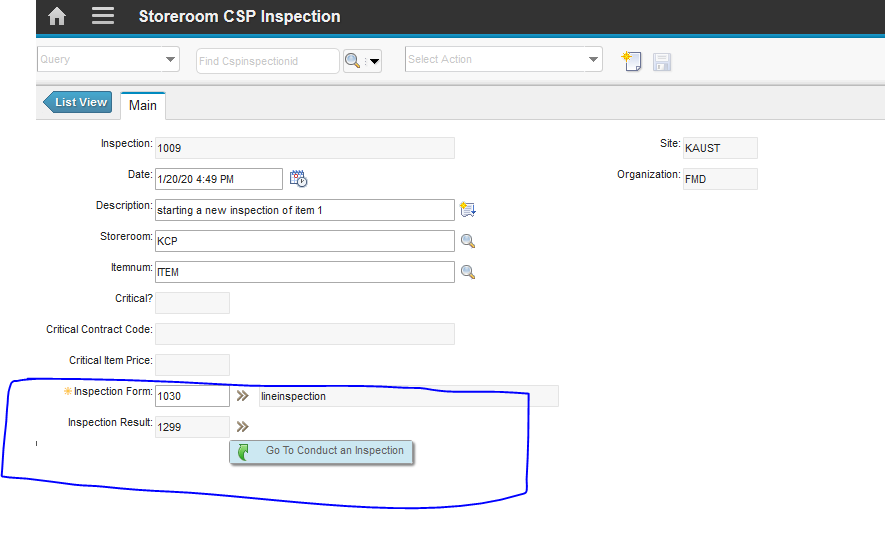
Item Inspection with Maximo Inpsection Form | Maximo

The new version of Maximo Inspection is based on Work Center, which is built on google polymer.
We create Inspection form and perform Adhoc Inspection for either Asset or Location.

2nd Option is to attach inspection form with Route, Job plan or directly with Work order.

What if we want to inspect something else? let say critical item inspection, can we use inspection module with this.
the answer was NO.

But with this little trick we can use this functionality with almost any application:

1. Create a new application, attach inspection form and result form with it.
2. create a new record, put item number, start the inspection.

below is the step by step instructions to create this.

1. Database Configuration:
create a new object let say (CSPINSPECTION) : add INSPFORMNUM as an addition to your required attributes.

Saturday, 18 January 2020

Express.js in 5 mintues | Node.js

npm install express

my fist HelloWorld application.

var express=require('express');    //use the express module
var app=express();     // create an object of express module
app.get('/', function (req,res){ //create a call back function
    res.send('helloworld'); //send helloworld response
});
var server = app.listen(3000, function(){ make the server listen on 3000
   
});
----

1. using require function we are including the express module.
2. we need to make an object for the express module we just included.
3. create a callback function to be called whenever the user hits our root (/)
4. in the callback function, we are sending a response to the user
5. call a listen to function to make our server listens to client requests on port 3000.
done. use this web address to confirm.
localhost:3000/

Route (/):
routes reads clients input and responds to the request. say GET,POST,PUT,Delete

Friday, 17 January 2020

Access Modifiers in Maximo | IBM Maximo

To use these we need to import one class (from psdi.mbo import MboConstants)

NOACCESSCHECK
NOVALIDATION
NOACTION


mbo.setValue("DESCRIPTION", "Update a read only field", mbo.NOACCESSCHECK)

To update a field and not perform the validation and action events:

mbo.setValue("DESCRIPTION", "Update a field without validation or action", mbo.NOVALIDATION|mbo.NOACTION)

Putting all three together:

mbo.setValue("DESCRIPTION", "Please be careful doing this", mbo.NOACCESSCHECK|mbo.NOVALIDATION|mbo.NOACTION)

Copy value while Duplicating an MBO in automation script | IBM Maximo

 
<MBONAME>.DUPLICATE


or example in this case we will name it WORKORDER.DUPLICATE to intercept the duplicate event. The


mbo is this mbo. 
dupmbo is duplicated mbo. 

lets say we want to copy a value from workorder to the new duplicated workorder. 

create a script with this name, 
<MBONAME>.DUPLICATE

in our example we will name it WORKORDER.DUPLICATE to intercept the duplicate event.


dupmbo.setValue("copiedfrom", mbo.getString("wonum"))

Monday, 30 December 2019

Add Estimated Duration into Start Date to Caluclate Finish Date | IBM Maximo

Write and Attribute Launch point on Schedule Start Date on Workorder, 

Script will take 2 inputs: Schedule Start date and Estimated Duration.
Add duration into start date and save the final output in schedule finish date.

Object: Workorder
Attribute: SCHEDSTART, Event: Validate


Script:
from java.util import Calendar
appName = mbo.getThisMboSet().getParentApp()
if appName == 'PLUSPWO' and mbo.getString("sp")  =='01' and mbo.getString("spcontract") == '005' and mbo.getInt("istask")  == 0 and mbo.getInt("historyflag") == 0 and mbo.getString("woclass") == 'WORKORDER' :
    if not mbo.isNull('SCHEDSTART'):
        vSSD = mbo.getDate("SCHEDSTART")
     
        #estduration in minutes
        vEstDuration = mbo.getFloat("ESTDUR")*60
   
        cal=Calendar.getInstance()
        cal.setTime(vSSD)
        cal.add(Calendar.MINUTE, long(vEstDuration))
        vNewSFD =  cal.getTime()
        mbo.setValue("SCHEDFINISH",vNewSFD,2L )

Wednesday, 4 December 2019

Accept Charges: Cannot Log Actuals Against a Work Order | IBM Maximo

We cannot report actual against this work order
or even we can't plan any direct issue material if this checkbox is cleared.

By default, this is Accept Charges checked.  
A checkbox in Work order Tracking the main screen:


Checkbox specifies whether or not the work order accepts charges. If the checkbox is selected (the default), the work order accepts charges. If the checkbox is cleared, the work order does not accept charges, and you cannot enter charges on the work order.

We cannot report actual against this work order
or even we can't plan any direct issue material if this checkbox is cleared.

By default, this is Accept Charges checked. 

Display Duplicate Problem Warning while Creating Workorder | Maximo


Organization > Work Order Options>>Other Organization Options>>
Display Duplicate Problem Warning section.

Maximo will display the Duplicate Problem dialog box when a user enters a work order for an asset that is already entered on another open work order with the same problem code. If the checkbox is selected, Maximo will display the dialog box. If the checkbox is cleared, Maximo will not display the dialog box.